
Introduction
Cyber security basics are no longer only for IT professionals or large companies. Today, anyone who uses a smartphone, computer, or the internet needs to understand cyber security basics to stay safe online. From social media accounts and online banking to emails and cloud storage, our daily life depends on digital systems. Because of this, cybercriminals are constantly looking for ways to steal data, money, or personal information.
Many beginners think cyber security is too technical or difficult to understand. In reality, cyber security basics focus on simple habits, awareness, and smart decisions. Knowing how attacks happen and how to prevent them can protect you from serious problems. Even small mistakes, like using weak passwords or clicking unknown links, can lead to big losses.
This guide is written in simple English for beginners and intermediate readers. It explains cyber security basics in a clear and practical way. You will learn what cyber security is, why it matters, and how you can protect yourself step by step. Real-life examples are included to make concepts easy to understand.
By the end of this article, you will have a strong foundation in cyber security basics. You will feel more confident using the internet, handling data, and protecting your digital life. Whether you are a student, freelancer, business owner, or everyday internet user, this knowledge will help you stay secure in an increasingly digital world.
What Is Cyber Security Basics?
Cyber security basics refer to the fundamental practices and concepts used to protect computers, networks, devices, and data from digital threats. These threats include hacking, malware, phishing, data breaches, and identity theft. The main goal is to keep information safe, private, and accessible only to authorized users.
At its core, cyber security basics involve protecting three things: confidentiality, integrity, and availability. Confidentiality ensures that data is only seen by the right people. Integrity makes sure information is not changed without permission. Availability ensures systems and data are accessible when needed.
Cyber security basics apply to many areas of digital life. This includes personal devices, home networks, workplaces, websites, and cloud services. It is not limited to complex software or tools. Simple actions like updating software, using strong passwords, and avoiding suspicious emails are also part of cyber security basics.
For beginners, understanding these basics helps build safe online habits. Instead of reacting after a problem happens, cyber security basics focus on prevention. This proactive approach reduces risks and builds digital confidence over time.
Why Is Cyber Security Basics Important?
Cyber security basics are important because cyber threats are growing every day. Hackers target individuals as much as they target businesses. Anyone connected to the internet can become a victim if they are not careful.
One major reason cyber security basics matter is data protection. Personal data like passwords, bank details, and private messages have high value. If stolen, this data can be misused for fraud, blackmail, or identity theft.
Another reason is financial safety. Online scams and malware can lead to direct money loss. Simple security awareness can prevent fake payment requests or harmful downloads.
Cyber security basics also protect your reputation. A hacked social media or email account can damage trust with friends, clients, or employers. In professional life, this can affect careers and business relationships.
Finally, cyber security basics help maintain peace of mind. Knowing how to stay safe online reduces stress and fear. You can browse, work, and communicate with confidence, knowing you are taking smart steps to protect yourself.
Detailed Step-by-Step Guide
Step 1: Understand Common Cyber Threats
The first step in cyber security basics is knowing what threats exist. Common threats include viruses, ransomware, phishing emails, spyware, and password attacks. Each threat works differently, but all aim to steal data or damage systems.
For example, phishing emails pretend to be from trusted sources. They trick users into clicking links or sharing information. Understanding these tricks helps you avoid falling for them.
Step 2: Use Strong and Unique Passwords
Passwords are the first line of defense in cyber security basics. Weak passwords are easy to guess or crack. Strong passwords include a mix of letters, numbers, and symbols.
Avoid using the same password on multiple accounts. If one account is hacked, others become vulnerable. Password managers can help store and generate strong passwords safely.
Step 3: Enable Two-Factor Authentication
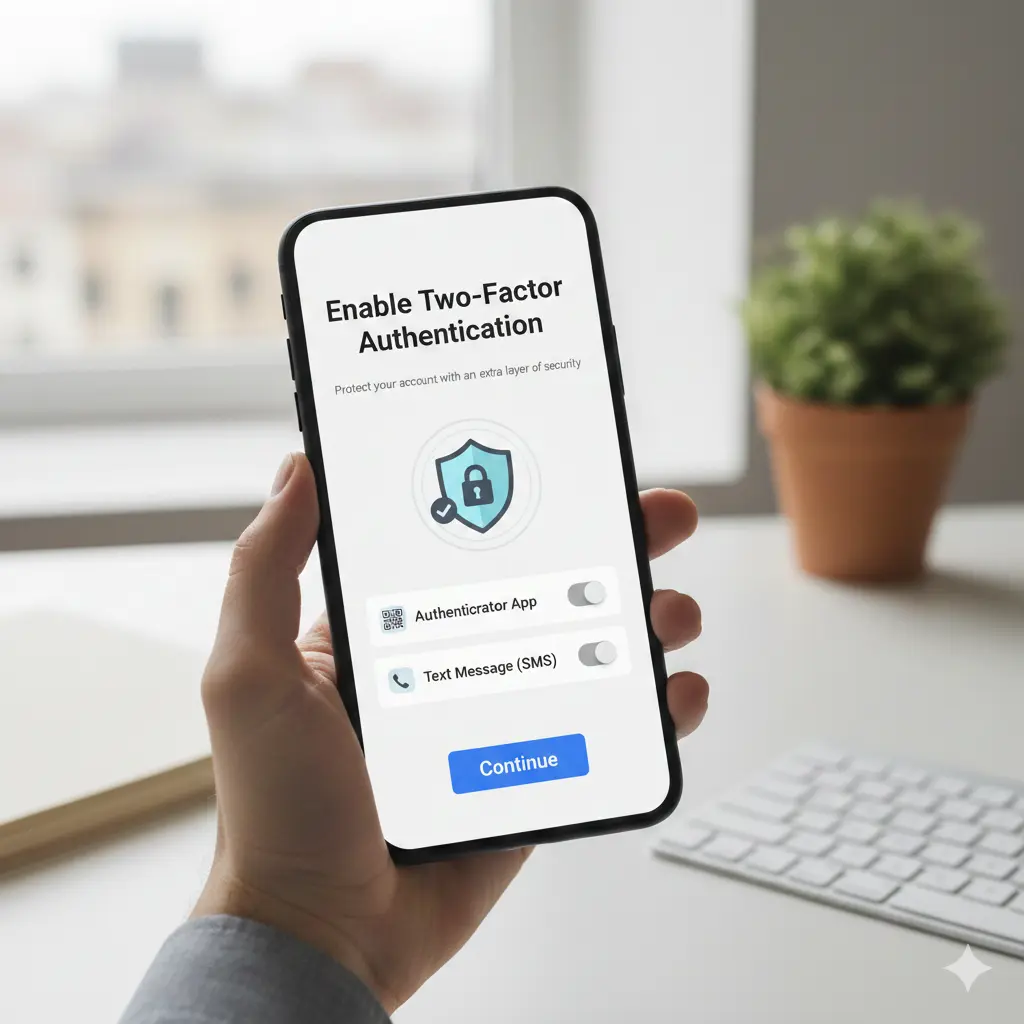
Two-factor authentication adds an extra layer of security. Even if someone gets your password, they still need a second code to access your account.
This code is usually sent to your phone or generated by an app. Enabling this feature is one of the most effective cyber security basics practices.
Step 4: Keep Software and Systems Updated
Updates fix security weaknesses that hackers exploit. Ignoring updates leaves your system open to attacks.
Always update your operating system, apps, browsers, and antivirus software. Automatic updates make this step easier and safer.
Step 5: Be Careful with Emails and Links
Emails are a common attack method. Never click links or download attachments from unknown senders.
Even trusted-looking emails can be fake. Check sender addresses and look for spelling or grammar errors. When unsure, do not respond.
Step 6: Secure Your Internet Connection
Home and public networks can be risky. Use strong passwords for Wi-Fi and change default router settings.
Avoid sensitive activities on public Wi-Fi. If necessary, use a secure connection method to protect your data.
Step 7: Back Up Important Data
Backups are a key part of cyber security basics. If data is lost or attacked, backups allow recovery.
Store backups on external drives or secure cloud services. Update backups regularly to keep data current.
Step 8: Install and Maintain Security Software
Security software helps detect and block threats. Antivirus and firewall tools are essential for basic protection.
Keep these tools updated and run regular scans. They work best when combined with safe user behavior.
Step 9: Control App and Device Permissions
Many apps request access to data they do not need. Review permissions carefully.
Limit access to location, contacts, and files. This reduces the risk of data misuse.
Step 10: Educate Yourself Continuously
Cyber threats evolve constantly. Staying informed is part of cyber security basics.
Read security tips, follow updates, and learn from real incidents. Awareness is one of the strongest defenses.
Benefits of Cyber Security Basics
- Protects personal and sensitive information
- Reduces risk of financial loss and fraud
- Improves online confidence and safety
- Prevents identity theft and account hijacking
- Enhances device and system performance
- Builds strong digital habits for the future
- Supports safe remote work and learning
- Helps businesses maintain trust and credibility
Disadvantages / Risks
- Requires time and regular attention
- Can feel complex for complete beginners
- Overconfidence may lead to careless actions
- Security tools may slow older devices
- Poor setup can give false sense of safety
Common Mistakes to Avoid
Many people ignore cyber security basics until a problem happens. One common mistake is using simple or repeated passwords. This makes accounts easy targets.
Another mistake is trusting every email or message. Cybercriminals often use urgency or fear to trick users. Always verify before acting.
Skipping software updates is also risky. Updates are not just for new features but for security fixes.
Some users rely only on security software and ignore safe habits. Tools help, but user behavior matters most.
Finally, sharing too much personal information online increases risk. Oversharing helps attackers create convincing scams.
FAQs
What are cyber security basics in simple terms?
Cyber security basics are simple steps and habits used to protect your digital devices and data from online threats. They focus on prevention and awareness.
Do beginners really need cyber security knowledge?
Yes, beginners are often the main targets. Basic knowledge helps avoid common scams and mistakes that lead to data loss.
Is antivirus software enough for protection?
Antivirus software helps, but it is not enough alone. Cyber security basics include passwords, updates, awareness, and safe behavior.
How often should I update my passwords?
Change passwords regularly, especially for important accounts. Update them immediately if you suspect a breach.
Are mobile devices also at risk?
Yes, smartphones and tablets face threats like malicious apps and phishing messages. Cyber security basics apply to all devices.
Can cyber security basics help small businesses?
Absolutely. Basic security practices protect customer data, reduce downtime, and build trust without high costs.
Expert Tips & Bonus Points
Create a routine for checking updates and backups. Small habits make a big difference over time.
Separate work and personal accounts when possible. This limits damage if one account is compromised.
Use caution with free software and downloads. Many threats hide in unofficial sources.
Log out of accounts on shared devices. Never save passwords on public systems.
Teach family members basic cyber security basics. Shared awareness improves overall safety.
Conclusion
Cyber security basics are essential skills in today’s digital world. As technology becomes more connected to daily life, the risks also increase. However, staying safe does not require advanced technical knowledge. It starts with awareness, simple habits, and consistent action.
This guide has shown that cyber security basics focus on prevention rather than fear. By understanding common threats, using strong passwords, updating systems, and staying alert, you reduce the chances of becoming a victim. These steps protect not only your data but also your time, money, and peace of mind.
For beginners, the key is to start small and stay consistent. You do not need to master everything at once. Each secure habit you build strengthens your digital safety. For intermediate users, refining these basics creates a strong foundation for advanced security practices.
Cyber threats will continue to evolve, but so can your knowledge. By applying cyber security basics in daily life, you take control of your online presence. This proactive approach helps you use technology confidently and responsibly. In the long run, understanding and practicing cyber security basics is one of the smartest investments you can make in the digital age.