
Introduction
Cyber security for beginners is one of the most important topics in today’s digital world. Almost everything we do is connected to the internet. We use smartphones, laptops, smart TVs, online banking, social media, and cloud storage every day. While these tools make life easier, they also create risks. Hackers, scammers, and cyber criminals are always looking for easy targets, especially people who are new to online security.
Many beginners believe cyber security is only for experts or large companies. In reality, every internet user needs basic protection. Even a simple mistake, like clicking a fake link or using a weak password, can lead to data theft, financial loss, or privacy issues. That is why learning cyber security for beginners is not optional anymore. It is a basic life skill, just like locking your house or protecting your wallet.
This guide is written in simple English so anyone can understand it. You do not need a technical background. Each concept is explained step by step with clear examples. You will learn what cyber security really means, why it matters, and how you can protect yourself online. By the end, you will feel more confident using the internet safely. Whether you are a student, professional, or casual user, this article will help you build a strong foundation in cyber security for beginners.
What is Cyber Security for Beginners?
Cyber security for beginners means protecting your digital life from online threats. It focuses on keeping your devices, data, and online accounts safe from unauthorized access. In simple words, it is about staying safe while using the internet.
Cyber security includes practices, tools, and habits that reduce the risk of cyber attacks. These attacks can target personal data, passwords, emails, photos, or even your money. Beginners often face threats like phishing emails, malware, fake websites, and account hacking.
Cyber security for beginners does not require advanced technical skills. It starts with understanding basic risks and learning simple protection steps. For example, using strong passwords, updating software, and avoiding suspicious links are part of basic cyber security.
The goal is prevention. Instead of fixing problems after damage happens, cyber security helps you stop threats before they cause harm. Once beginners understand the basics, they can build stronger habits over time.
Why is Cyber Security for Beginners Important?
Cyber security for beginners is important because online threats are increasing every year. Cyber criminals target individuals as much as businesses. Beginners are often easy targets because they may not recognize warning signs.
Personal data is valuable. Your name, email, phone number, passwords, and banking details can be misused if stolen. Cyber attacks can lead to identity theft, financial loss, and emotional stress.
Another reason cyber security for beginners matters is privacy. Many people share personal information online without realizing the risks. Without protection, private data can be tracked, leaked, or sold.
Cyber security also helps protect devices. Malware can slow down systems, delete files, or spy on activities. With basic security steps, beginners can avoid most common threats.
Most importantly, cyber security builds confidence. When users feel safe online, they can explore, learn, and work without fear. That is why cyber security for beginners is essential in the modern digital world.
Detailed Step-by-Step Guide
Understanding Common Cyber Threats
Before learning protection, beginners must understand common threats. Phishing is one of the most common attacks. It involves fake emails or messages that look real but aim to steal information.
Malware is another threat. It includes viruses, spyware, and ransomware that harm devices. Malware often enters through unsafe downloads or infected websites.
Password attacks are also common. Weak or reused passwords make it easy for hackers to access accounts. Beginners often underestimate this risk.
Social engineering is a trick-based attack. Hackers manipulate users into sharing sensitive information. Awareness is the first defense.
Creating Strong Passwords
Strong passwords are the foundation of cyber security for beginners. A good password should be long and unique. It should include letters, numbers, and symbols.
Avoid using personal information like names or birthdates. Also, never reuse the same password for multiple accounts.
Using a password manager can help beginners store passwords safely. This reduces the need to remember many passwords.
Changing passwords regularly adds another layer of protection. Strong passwords greatly reduce hacking risks.
Using Two-Factor Authentication
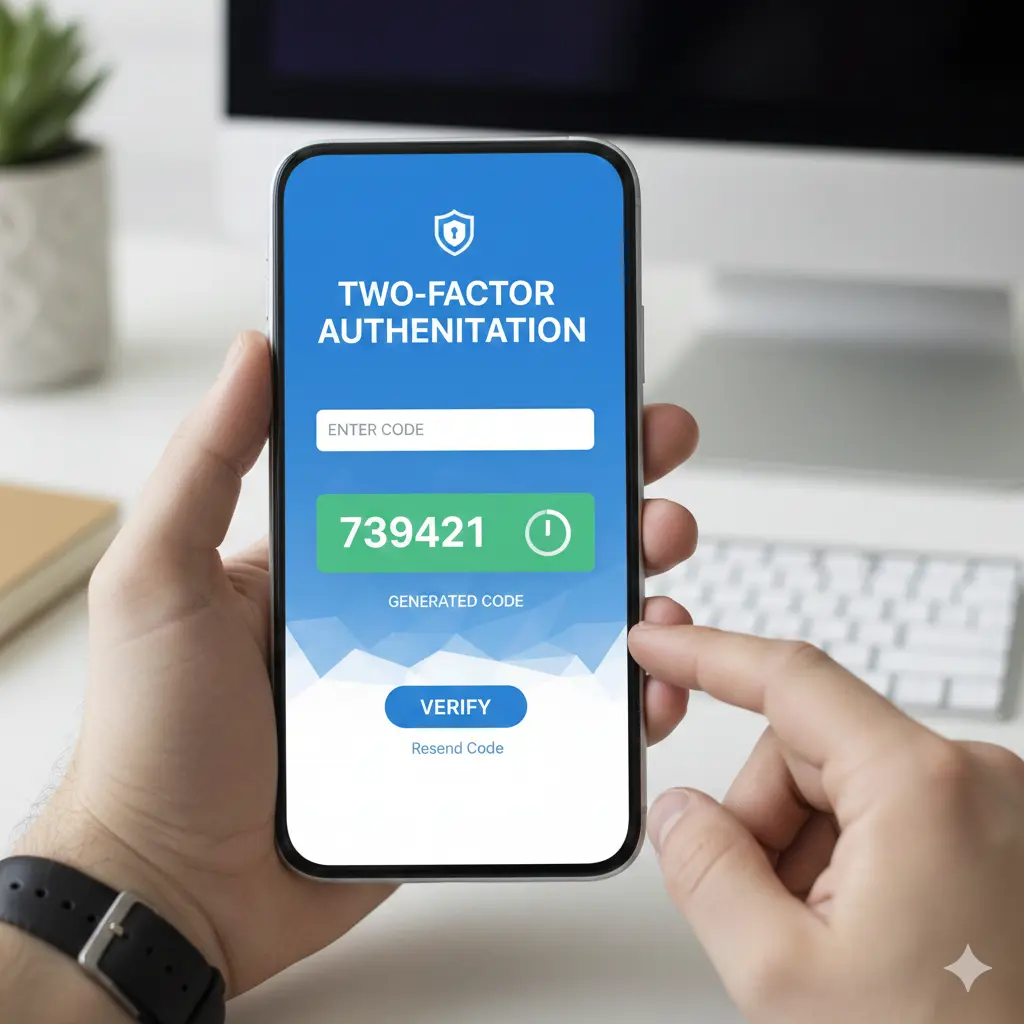
Two-factor authentication adds extra security. It requires a second step besides a password. This could be a code sent to your phone or email.
Even if a hacker gets your password, they cannot access your account without the second factor. Beginners should enable this feature wherever possible.
Two-factor authentication is easy to use and very effective. It is a simple way to improve cyber security for beginners.
Keeping Software Updated
Software updates fix security weaknesses. Hackers often exploit outdated software. Beginners sometimes ignore updates, which increases risk.
Always update your operating system, apps, and antivirus software. Enable automatic updates when possible.
Updates also improve performance and add new features. Keeping software updated is a basic but powerful security habit.
Installing Antivirus and Firewall
Antivirus software detects and removes malware. It scans files and websites for threats. Beginners should install reliable antivirus protection.
A firewall controls incoming and outgoing network traffic. It blocks suspicious connections. Most devices include built-in firewalls that should be enabled.
Together, antivirus and firewall tools form a strong defense. They protect devices from many common attacks.
Safe Browsing Practices
Safe browsing is an important part of cyber security for beginners. Avoid clicking unknown links or pop-up ads.
Check website addresses carefully. Secure websites usually start with HTTPS. Fake websites often look similar to real ones.
Do not download files from untrusted sources. Free downloads can hide malware.
Using a trusted browser with security features adds protection. Simple browsing habits reduce many risks.
Protecting Personal Information
Sharing personal information online should be done carefully. Avoid posting sensitive details on public platforms.
Review privacy settings on social media accounts. Limit who can see your posts and personal data.
Be cautious when filling online forms. Only share information with trusted websites.
Protecting personal data is a key goal of cyber security for beginners.
Using Secure Wi-Fi Networks
Public Wi-Fi networks are risky. Hackers can monitor unprotected connections. Beginners should avoid accessing sensitive accounts on public Wi-Fi.
Use a strong password for home Wi-Fi. Change default router settings to improve security.
Using a virtual private network adds extra protection on public networks. Secure Wi-Fi usage prevents data interception.
Benefits of Cyber Security for Beginners
- Protects personal data from theft
- Reduces risk of financial loss
- Improves privacy and online safety
- Builds confidence in internet use
- Prevents malware and hacking attacks
- Saves time by avoiding recovery issues
- Encourages responsible digital habits
Disadvantages / Risks
- Requires time to learn basic practices
- Some tools may have a learning curve
- Security software can slow older devices
- Overconfidence may lead to carelessness
- Ignoring updates can reduce protection
Common Mistakes to Avoid
Many beginners make avoidable mistakes. Using weak passwords is one of the biggest errors. Password reuse also increases risk.
Ignoring software updates leaves devices vulnerable. Beginners often delay updates without realizing the danger.
Clicking unknown links is another common mistake. Curiosity can lead to malware infections.
Sharing too much personal information online increases exposure. Privacy settings should not be ignored.
Finally, relying only on one security method is risky. Cyber security for beginners works best with multiple layers of protection.
FAQs
What is the first step in cyber security for beginners?
The first step is awareness. Understanding common online threats helps beginners recognize danger. Learning basic habits like strong passwords and safe browsing builds a solid foundation.
Do beginners need antivirus software?
Yes, antivirus software is important. It protects devices from malware and harmful files. Beginners benefit from real-time protection and automatic scanning.
Is cyber security difficult to learn?
Cyber security for beginners is not difficult. Basic concepts are simple and practical. With regular practice, security habits become routine.
Can mobile phones be hacked?
Yes, mobile devices can be targeted. Malicious apps, fake messages, and unsafe networks can compromise phones. Basic security steps protect mobile users.
How often should passwords be changed?
Passwords should be changed regularly, especially if a breach is suspected. Using unique passwords for each account reduces risk.
Is public Wi-Fi always unsafe?
Public Wi-Fi is risky but not always dangerous. Avoid accessing sensitive accounts and use additional protection for safety.
Expert Tips & Bonus Points
Experts recommend using layered security. Do not rely on a single tool or habit. Combine strong passwords, updates, and antivirus protection.
Regularly back up important data. This protects against data loss and ransomware attacks.
Educate yourself continuously. Cyber threats evolve, so learning should never stop.
Trust your instincts. If something feels suspicious, avoid it. Awareness is a powerful defense.
Finally, practice safe digital behavior daily. Cyber security for beginners improves with consistency and caution.
Conclusion
Cyber security for beginners is not about fear or complexity. It is about awareness, smart habits, and simple tools that protect your digital life. As technology becomes part of everyday routines, online safety becomes essential for everyone. Beginners who ignore cyber security often face avoidable problems, while informed users stay protected.
This guide explained cyber security in simple terms. You learned what it means, why it matters, and how to apply it step by step. From strong passwords to safe browsing, each action plays an important role. Cyber security for beginners does not require expensive tools or advanced skills. It starts with small changes that make a big difference.
The internet is a powerful resource for learning, communication, and growth. With the right security practices, beginners can enjoy its benefits without unnecessary risks. Staying safe online builds confidence and peace of mind. Make cyber security part of your daily routine, and you will be better prepared for the digital future.